The OSI model
The Transport Layer (Layer 4)
A beginner friendly explanation of how data reaches the correct program on a machine, and the difference between TCP and UDP.
Layer 3 gets your data to the correct machine. But a single machine runs many programs at the same time: a web browser, a music app, a file download, and more. When data arrives, the computer needs to know which of those programs it belongs to. Sorting incoming data into the correct program, and deciding how carefully to deliver it, is the job of Layer 4 of the OSI model.
Layer 4 answers: can the data reach the correct program on the other machine, and how reliable does that delivery need to be?
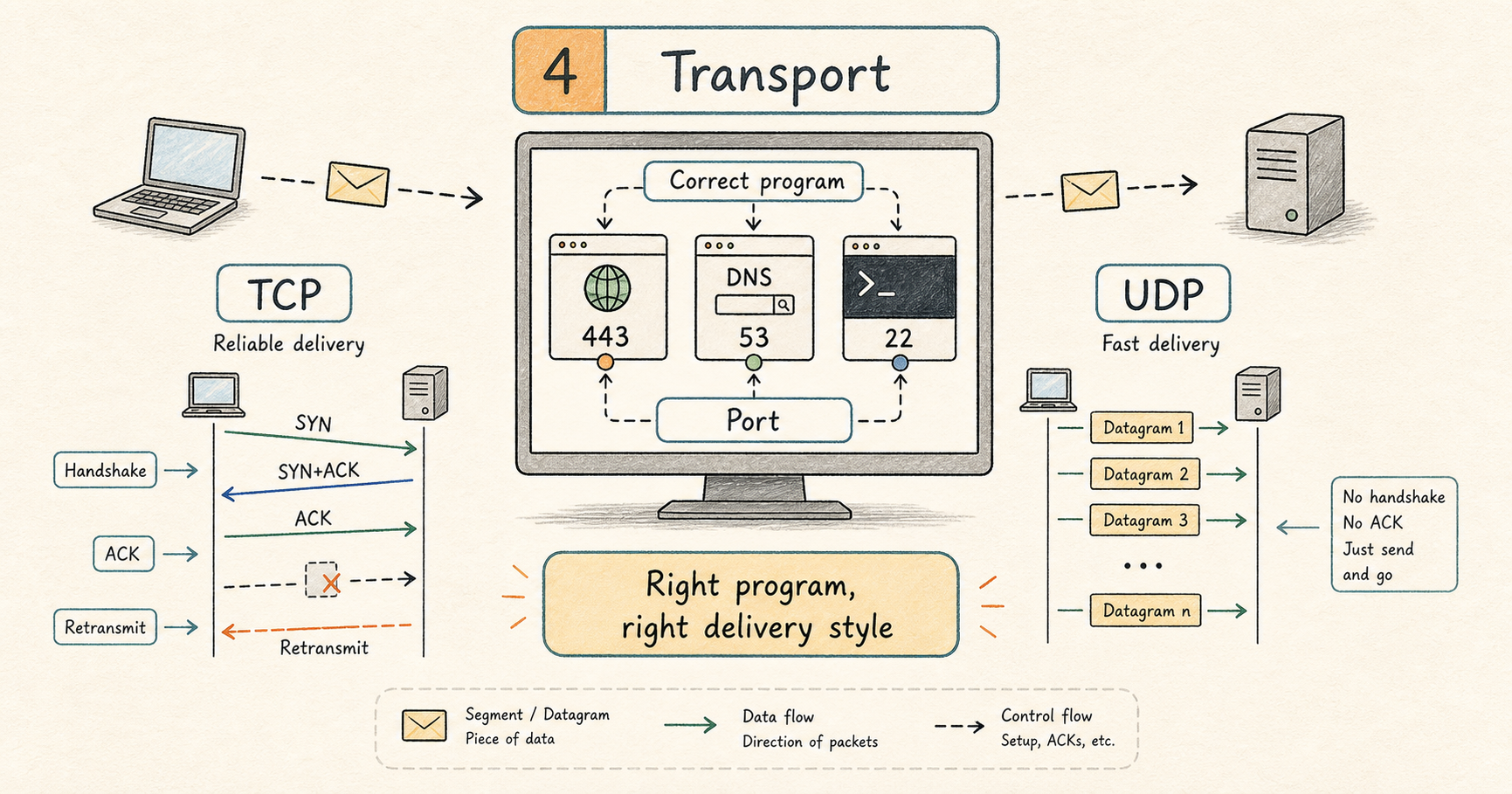
What this layer does
The Transport layer adds a port number so data reaches the correct program, and it picks one of two delivery styles. One style is careful and guarantees everything arrives in order (called TCP). The other style is fast and does not double check anything (called UDP). Everything above this layer simply hands over its data and trusts the Transport layer to deliver it.
Ports
A port is a number that identifies a specific program or service on a machine. If the IP address is like the street address of an apartment building, the port number is like the apartment number that says which unit inside the building the delivery is for.
Some port numbers are standard and widely agreed on, so programs know where to find common services:
- Port
80is used for normal web traffic (HTTP). - Port
443is used for secure web traffic (HTTPS). - Port
22is used for remote login to a server (SSH). - Port
53is used for looking up names (DNS).
A single connection is identified by four things together: the sender’s IP address, the sender’s port, the receiver’s IP address, and the receiver’s port. That combination is what lets one server keep thousands of separate conversations straight at the same time without mixing them up.
TCP: careful and reliable
TCP (Transmission Control Protocol) is used when the data absolutely must arrive complete and in the right order, such as loading a web page, downloading a file, or sending an email. It is the most important protocol at this layer, so it is worth understanding how it actually works.
A good mental picture to keep in mind: TCP is like a careful courier who gets a signature for every package and re-sends anything that gets lost. Before we look at how it delivers, let us look at how a TCP conversation begins.
The three way handshake
Before sending any real data, the two computers perform a short setup ritual to agree to talk. This is called the three way handshake, because it takes three messages. Think of it like a quick phone greeting: one person says hello, the other says hello back, and the first confirms they can hear them. Only then does the real conversation start.
Two small words show up in these messages:
- SYN is short for “synchronize”. It means “I want to start a connection, and here is my starting number.”
- ACK is short for “acknowledge”. It means “I received what you sent.”
Here is the whole handshake. The computer starting the connection is the client (for example your browser), and the one it connects to is the server (for example a website):
  Client                            Server
  |                                      |
  |--- SYN  seq=100 -------------------->|
  |                                      |
  |<--- SYN+ACK  seq=500, ack=101 -------|
  |                                      |
  |--- ACK  ack=501 -------------------->|
  |                                      |
|======= connection established =======|- The client sends a SYN to ask for a connection.
- The server replies with a SYN and an ACK together: it acknowledges the client’s request and makes its own request back.
- The client sends a final ACK.
You will notice seq and ack in the diagram. The seq (sequence) is the sender’s own starting number, and the ack (acknowledge) is the number it expects next, which also confirms what it has already received. So ack=101 means “I got everything up to 100, send me 101 next.” After these three messages, the connection is open and both sides can send data.
How TCP makes sure nothing gets lost
TCP gives every piece of data a sequence number, which is just a counter marking where that piece falls in the overall stream. For everything it sends, TCP waits for the other side to send back an acknowledgement confirming the piece arrived. If that confirmation does not come back in time, TCP assumes the piece was lost and sends it again. Sending it again is called retransmission.
  Client                            Server
  |--- data  bytes 1..100 -------------->|
  |<--- ACK  got up to 100 --------------|
  |                                      |
  |--- data  bytes 101..200 --> X        |
  |                                      |
  |         (no ACK, so resend)          |
  |--- data  bytes 101..200 ------------>|
  |<--- ACK  got up to 200 --------------|
In the third arrow the data is lost on the way, marked with an X. No acknowledgement comes back, so after a short wait the client simply sends that piece again.
This constant confirming and resending is exactly why TCP never loses data. It is also why a bad connection feels slow with TCP rather than broken: the data still gets through, it just takes extra rounds of resending.
Keeping data in order, and pacing the speed
Because every piece is numbered, the receiver can put the pieces back in the correct order even if they arrive scrambled, and it can spot and discard any accidental duplicates.
TCP also paces itself. If the network or the other machine starts to get overwhelmed, TCP automatically slows down, then speeds back up when things recover. You do not configure any of this; it happens on its own.
Closing the connection
When a side is finished, it does not just vanish. It sends a FIN message, short for “finish”, to say “I am done sending.” The other side acknowledges it and sends its own FIN when it is ready, so the connection is closed cleanly from both ends.
  Client                            Server
  |--- FIN   I'm done sending ---------->|
  |<--- ACK   okay ----------------------|
  |<--- FIN   I'm done too --------------|
  |--- ACK   okay, closing ------------->|
There is also a faster, less polite way to end things: a reset, often shortened to RST. A reset immediately tears the connection down, and it is what you are seeing when a connection is abruptly refused or dropped instead of closed gracefully.
UDP: fast and simple
UDP (User Datagram Protocol) just sends data toward the destination without a handshake, without waiting for confirmation, and without putting things back in order. If a piece gets lost, it is simply gone.
That sounds worse, but it is exactly what you want when speed matters more than perfection: live video calls, online games, and voice chat. In a video call, it is better to skip one lost moment and keep going than to freeze while waiting for it to be resent.
TCP or UDP, which one
| TCP | UDP | |
|---|---|---|
| Sets up a connection first | Yes, with a handshake | No |
| Guarantees delivery | Yes, resends lost data | No, best effort |
| Keeps data in order | Yes | No |
| Speed and overhead | Slower, more overhead | Fast, very little overhead |
| Best for | Web pages, files, email | Video calls, games, voice |
The whole trade off is this: reliable but heavier, or fast but with no guarantees.
Devices and terms you will see at this layer
The two main protocols are TCP and UDP. Some firewalls and load balancers work at this layer too. A firewall allows or blocks traffic based on rules, and at this layer it makes decisions based on port numbers, for example allowing port 443 while blocking others. A load balancer spreads incoming connections across several servers so no single one is overloaded.
What tends to go wrong here
Once addressing and routing (Layer 3) are confirmed, the common Layer 4 problems are:
- The program you are trying to reach is not running, or is listening on a different port than expected.
- A firewall is blocking the port.
- The service is set to accept connections only from the machine itself, so it cannot be reached from the network.
- The connection keeps getting reset, meaning the other side is actively refusing it.
- Data is being lost on the way, which with TCP shows up as slowness from constant resending.
A very useful shortcut: if ping works (that is a Layer 3 success) but connecting to the actual service fails, the problem is almost always here at Layer 4.
Simple rule
Layer 3 reaches the right machine. Layer 4 reaches the right program on that machine and decides how reliable the delivery is. If the machine is reachable but the connection is refused, look at the port, the firewall, and whether the program is actually running.
Related topics
- Start here: OSI Model
- The layer below: The Network Layer (Layer 3)
- The layer above: Session, Presentation, and Application (Layers 5 to 7)