The OSI model
The Network Layer (Layer 3)
A beginner friendly explanation of how data finds its way between different networks, covering IP addresses, subnets, routing, and NAT.
The layers below this one can only deliver data to a device on the same local network, like two computers plugged into the same office switch. But most of the time you want to reach a machine on a completely different network, such as a website hosted in another country. Getting data from one network to another is the job of Layer 3 of the OSI model.
Layer 3 answers one question: can this data reach the correct network, wherever it is in the world? This is where a lot of the ideas people think of as “how the internet works” actually live, so we will take it slowly.
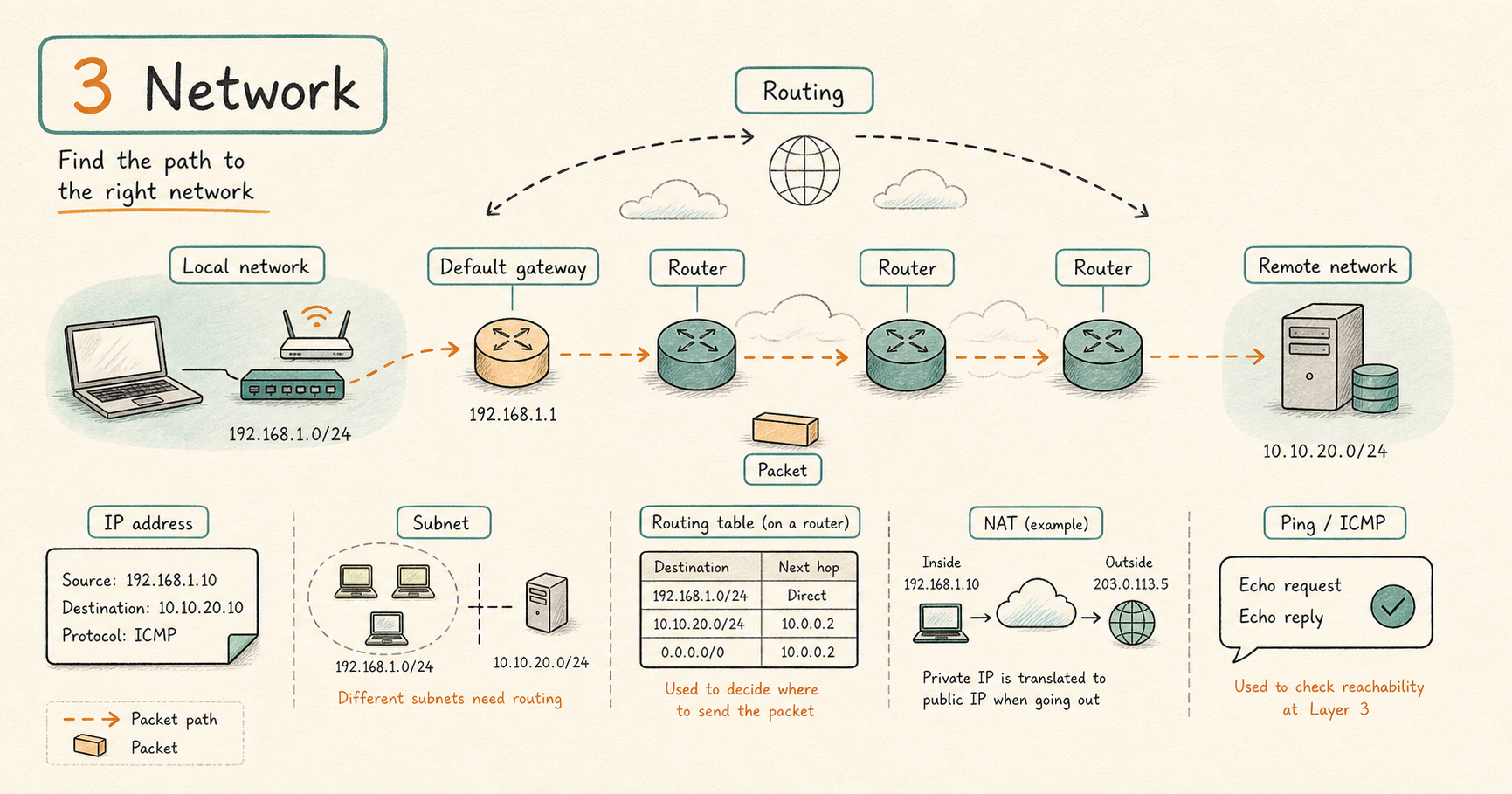
What this layer does
The Network layer takes your data, breaks it into pieces called packets, and gives each packet a “from” address and a “to” address. These addresses are IP addresses, and unlike the hardware addresses from the lower layers, IP addresses are designed to work across many networks, not just a local one. The layer then decides, step by step, which direction each packet should travel to get closer to its destination.
IP addresses
An IP address (Internet Protocol address) is the address that identifies a device on a network, similar to how a street address identifies a house. There are two versions in use today:
- IPv4 is the older and most common version. It looks like
192.168.1.10, four numbers separated by dots. There are only about 4.3 billion of these addresses, and the world ran out of fresh ones, which is part of why the next two topics (NAT and IPv6) exist. - IPv6 is the newer version, created to solve that shortage. It is longer and looks like
2001:db8::1. There are so many IPv6 addresses that we will effectively never run out.
Every IP address has two parts. One part says which network the device is on, and the other part says which specific device it is on that network. What decides where the split falls is the subnet mask, which is the next topic.
Subnets and the subnet mask
A subnet is simply a smaller network carved out of a larger one. The subnet mask is the setting that marks where the “network” part of an address ends and the “device” part begins.
You will often see this written in a shorthand called CIDR notation, which puts a slash and a number after the address. For example, /24 means the first 24 digits of the address identify the network, and the rest identify the device.
192.168.1.0/24describes a network with 256 addresses, where the usable devices are192.168.1.1through192.168.1.254.
Why does this matter? Because every device uses the subnet mask to answer a crucial question before sending anything: “is the destination on my own local network, or somewhere else?” If it is local, the device delivers it directly using the lower layers. If it is somewhere else, the device sends it to the default gateway, described below.
Routers, routing, and the default gateway
A router is a device that connects different networks together and passes data between them. If a switch connects devices inside one network, a router connects one network to another.
To make good decisions, each router keeps a routing table, which is a list of rules that say “to reach this network, send the data to this next location.” A packet crossing the internet is handed from router to router, and each router moves it one step closer to its destination. Each of these steps is called a hop.
The default gateway is the specific router that a device sends data to whenever the destination is not on its own local network. It is the “exit door” to the rest of the world. A missing or wrong default gateway is one of the most common reasons a computer can reach other machines nearby but cannot reach anything on the internet.
NAT
NAT (Network Address Translation) is a clever trick that lets many devices share a single public internet address. Your home or office has one public IP address given by your internet provider, but you might have a laptop, a phone, and a TV all online at once, each with its own private address like 192.168.1.x.
When your laptop sends data out, the router rewrites the “from” address, swapping your private address for the one shared public address. When the reply comes back, the router reverses the swap and hands it to the right device. This is why your private address works fine at home but is invisible to the outside internet.
ICMP and ping
ICMP (Internet Control Message Protocol) is a helper protocol at this layer used for status and error messages rather than for carrying your actual data. For example, when a destination cannot be reached, a router can use ICMP to report that back.
The well known tool ping uses ICMP to check whether another device is reachable and how long a round trip takes. One thing to know: some networks block ICMP for security reasons, so a failed ping does not always mean the device is truly down. Treat it as a hint, not proof.
Devices and terms you will see at this layer
Routers and Layer 3 firewalls (a firewall is a device that allows or blocks traffic based on rules), plus IP addresses, subnets, routing, NAT, and ICMP.
What tends to go wrong here
Once you have confirmed the local network is healthy (Layers 1 and 2), the common Layer 3 problems are:
- A wrong subnet mask, so a device misjudges what counts as local versus remote.
- A missing or wrong default gateway, so local traffic works but nothing on the internet does.
- A router that has no route to the destination network.
- NAT set up incorrectly, so outgoing connections work but incoming ones fail.
- ICMP being blocked, which hides otherwise useful clues from tools like ping.
Simple rule
Layer 3 is about reaching the right network. If you can talk to machines on your own local network but nothing beyond it, look here first: the IP address, the subnet mask, and the default gateway.
Related topics
- Start here: OSI Model
- The layer below: Physical and Data Link (Layers 1 and 2)
- The layer above: The Transport Layer (Layer 4)