The OSI model
Session, Presentation, and Application (Layers 5 to 7)
A beginner friendly explanation of the top of the network stack, where conversations, encryption, and everyday protocols like DNS and HTTP live.
The lower four layers exist to get your data reliably from one program to another. The top three layers are where that data finally becomes something meaningful: an ongoing conversation, information in a format both sides understand, and the well known services you use every day like websites and email. These are the top layers of the OSI model.
In real systems these three layers blend together, and the everyday internet model (called TCP/IP) actually treats them as one big “Application” layer. We group them in a single post here for the same reason. All three work with plain data, without the special packaging names used lower down.
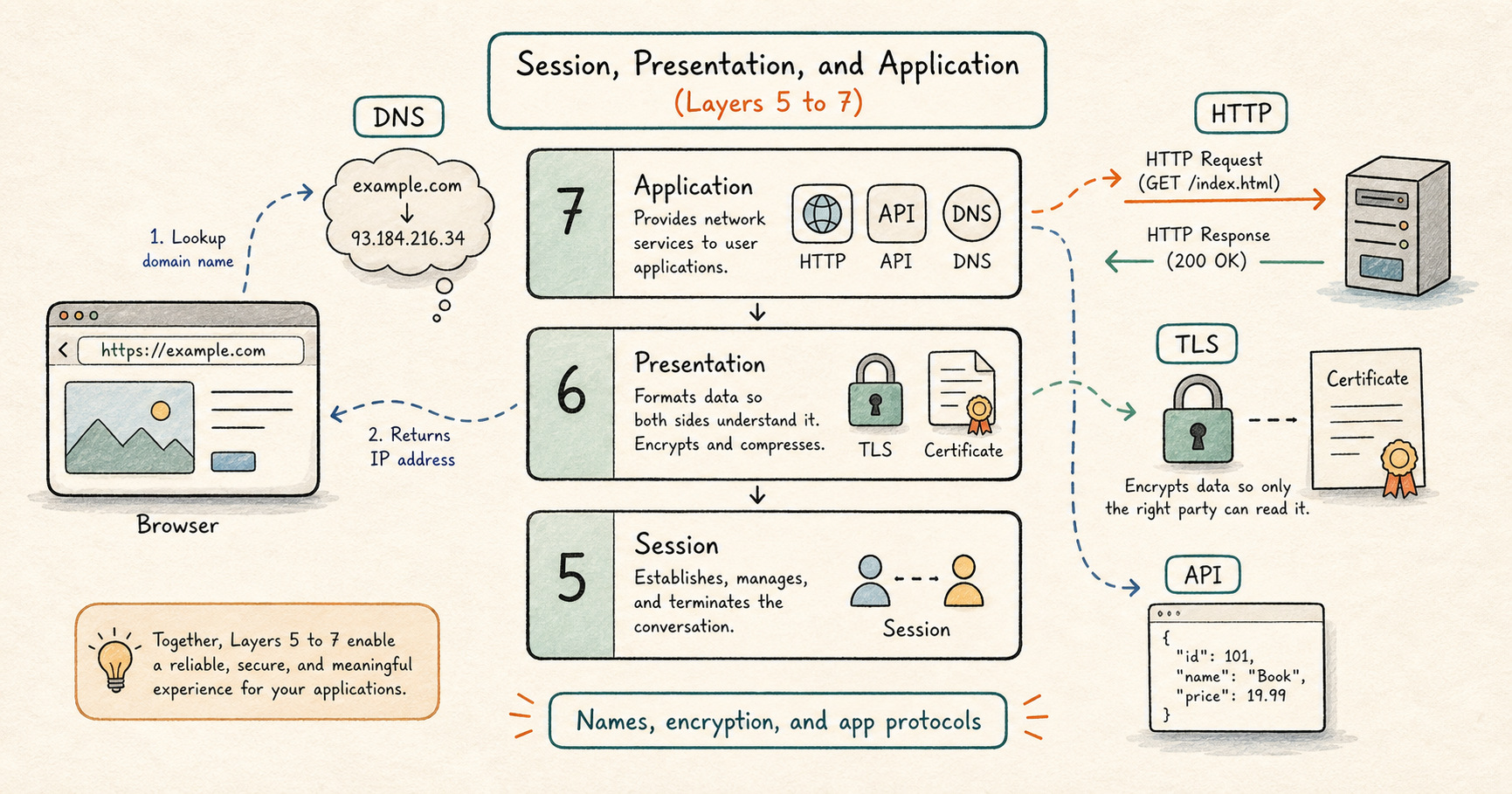
What these three layers do
- Layer 5, the Session layer, opens a conversation between two devices, keeps it going, and closes it when done.
- Layer 6, the Presentation layer, makes sure the data is in a format both sides can read, and handles encryption.
- Layer 7, the Application layer, is the set of services and rules that the programs you use speak directly.
Layer 5: the Session layer
A session is an ongoing conversation between two devices that lasts over time, rather than a single one off message. Think of it like a phone call: it gets opened, it stays connected while you talk, and then it gets hung up.
In real systems, this shows up as things like a login that stays valid for a while, or a long running connection to a database that an app reuses again and again instead of reconnecting every time.
The typical problems here are conversations that quietly expire or get dropped after a period of no activity. A classic symptom is something that works at first and then stops after it has been idle for a while. That is usually a session that timed out.
Layer 6: the Presentation layer
The Presentation layer makes data understandable to both sides. It handles two main things.
The first is format and encoding, which means agreeing on how the data is written down. Common formats you may have heard of are JSON and XML, which are standard ways to structure information so that different programs can read it. If one side sends data in a format the other side does not expect, the exchange fails even when the network itself is fine.
The second is encryption, which means scrambling the data so that anyone who intercepts it in transit cannot read it. The main technology here is TLS (Transport Layer Security). TLS is what turns ordinary web traffic (HTTP) into secure web traffic (HTTPS), shown by the padlock in your browser.
To do this safely, TLS relies on a certificate, which is a kind of digital ID card that proves a website really is who it claims to be. Your browser checks that certificate before trusting the connection. A lot of “the secure site will not load” problems come from certificates: one that has expired, one that is not trusted, or the two sides failing to agree on a common encryption method.
Layer 7: the Application layer
This is the layer you actually touch. Every app on your devices, your browser, your email client, a mobile game, speaks some application protocol here, which is just an agreed set of rules for that kind of task. When people say “networking,” this is usually the part they picture. It is worth spending real time on, so the rest of this post digs into the protocols you will meet most.
DNS: turning names into addresses
DNS (Domain Name System) translates a friendly name like example.com into the numeric IP address the network actually needs, such as 93.184.216.34. It works like a phone book, or like saving a contact by name instead of memorizing their number. Computers route data using numbers, but humans remember names, and DNS bridges the two.
The device that answers your lookups is called a resolver, usually run by your internet provider or a public service. When you visit a site, your computer quietly asks the resolver first:
  Browser                       DNS resolver
  |--- "what is the IP of example.com?" -->|
  |<--- "it is 93.184.216.34" -------------|
To avoid asking every single time, answers are cached (remembered for a while) on your computer and along the way, so repeat visits are faster. DNS mostly uses UDP on port 53. Because nothing else can happen until a name becomes an address, DNS is very often the first thing to check when a site will not load.
HTTP: the language of the web
HTTP (HyperText Transfer Protocol) is the set of rules browsers and servers use to exchange web pages and data. It follows a simple request and response pattern: your browser sends a request, the server sends back a response. Nothing comes from the server unless you ask for it.
  Browser                         Web server
  |--- GET /products --------------------->|
  |<--- 200 OK  (here is the page) --------|
The address you type is a URL. A URL (the web address in your bar) is made of parts, and each part tells the browser something specific:
| Part | Example | What it means |
|---|---|---|
| Scheme | https | How to talk (here, secure web traffic) |
| Host | www.example.com | Which server (the name DNS looks up) |
| Port | 443 | Which program on that server (often hidden) |
| Path | /products | Which specific page or resource you want |
| Query | ?id=42 | Extra details for the request |
The request has a verb, called a method, that says what you want to do:
| Method | What it does |
|---|---|
| GET | Read or fetch something (loading a page) |
| POST | Send or create something new (submitting a form) |
| PUT | Update something that already exists |
| DELETE | Remove something |
The response starts with a status code, a three digit number that says how it went. You only need the first digit to get the gist:
| Starts with | Meaning | Common examples |
|---|---|---|
| 2 | Success | 200 OK |
| 3 | Go look somewhere else | 301 Moved Permanently |
| 4 | Your request had a problem | 404 Not Found, 403 Forbidden |
| 5 | The server had a problem | 500 Internal Server Error, 503 Service Unavailable |
Both the request and the response also carry headers, which are small labels of extra information (for example, what format the data is in, or login details), followed by the actual content, called the body (the page or data itself).
HTTPS: HTTP with a lock on it
HTTPS is simply HTTP wrapped in the TLS encryption described earlier in the Presentation layer section. The rules of the conversation are identical; the difference is that everything is scrambled in transit so no one in between can read or tamper with it. The padlock in your browser means HTTPS is in use. Today it is the default for almost every serious website, which is why certificate problems (an expired or untrusted certificate) are such a common cause of a site refusing to load.
APIs: how programs talk to each other
Not all web traffic is for humans looking at pages. When a weather app shows the forecast, it is quietly calling an API (Application Programming Interface), which is a way for one program to request data from another over the network. Most modern APIs use the same HTTP methods and status codes above, and they usually send data as JSON, a simple text format that is easy for programs to read. A JSON reply might look like this:
{
  "city": "London",
  "temperature": 14,
  "unit": "celsius"
}
This style of using plain HTTP requests to fetch and change data is often called REST, and it is how a huge share of apps and services communicate behind the scenes.
Other protocols you will meet
- SSH (Secure Shell) lets you securely log in to and control a remote computer’s command line over the network. It is what administrators use to manage servers.
- SMTP, IMAP, and POP are the email protocols. SMTP sends mail between servers, while IMAP and POP let your email app fetch messages to read.
- FTP (File Transfer Protocol) is an older way to move files between computers.
- WebSocket keeps a connection open both ways so a server can push updates instantly, which is how live chat and notifications work.
Putting it together: loading a web page
The application layer rarely works alone. Here is what actually happens the moment you type https://example.com and press enter, and where each step lives in the OSI model:
- DNS lookup (Layer 7). Your browser asks a resolver for the IP address behind
example.com. - TCP handshake (Layer 4). Your browser opens a reliable connection to that IP address using the three way handshake.
- TLS setup (Layer 6). The two sides agree on encryption and the browser checks the certificate, turning the connection secure.
- HTTP request (Layer 7). Your browser sends
GET /asking for the page. - HTTP response (Layer 7). The server replies with
200 OKand the page content, and your browser draws it on screen.
All of that usually happens in well under a second, every time you open a site.
Devices and terms you will see at these layers
Protocols like DNS, HTTP, HTTPS, SSH, and SMTP. Some advanced firewalls and gateways also work here, and because they can read the full request, they can make detailed decisions about it, though this takes more effort than the simpler checks done at the lower layers.
What tends to go wrong here
By the time you reach these layers, the network path is usually working and the trouble is in the conversation itself:
- A name that will not resolve, because of a DNS problem, so nothing can connect.
- Certificate or encryption errors, such as an expired or untrusted certificate.
- The two sides disagreeing on the data format.
- A session that expired after sitting idle.
- Application level issues, such as a wrong password, a request the server rejects (a 4xx status code), a server that is failing (a 5xx status code), or a service the app depends on being down.
Simple rule
If the program is reachable (a Layer 4 success) but the request still fails, the problem is up here: name lookup, encryption, data format, the session, or the application’s own logic. Check DNS first, because it is the most common culprit.
Related topics
- Start here: OSI Model
- The layer below: The Transport Layer (Layer 4)
- A related pattern: Forward Proxy and Reverse Proxy