Foundations
Networking
A beginner friendly map of the seven OSI layers, what each one does, and how data travels through them.
When two computers talk to each other over a network, a lot has to happen. The data has to be turned into a signal, sent across a cable or through the air, addressed to the right machine, routed across the world, handed to the right program, and finally displayed to you. That is a lot of separate jobs.
The OSI model is a way to organize all of those jobs into seven layers. Each layer has one clear responsibility, and each layer depends on the one below it. You can think of the seven layers as a team, where every member does one part of the work and passes the result to the next member. No single layer can do the whole job alone.
The letters OSI stand for Open Systems Interconnection. You do not need to memorize the name. What matters is the idea: networking is a stack of layers, and knowing which layer does what makes everything else easier to understand and to fix.
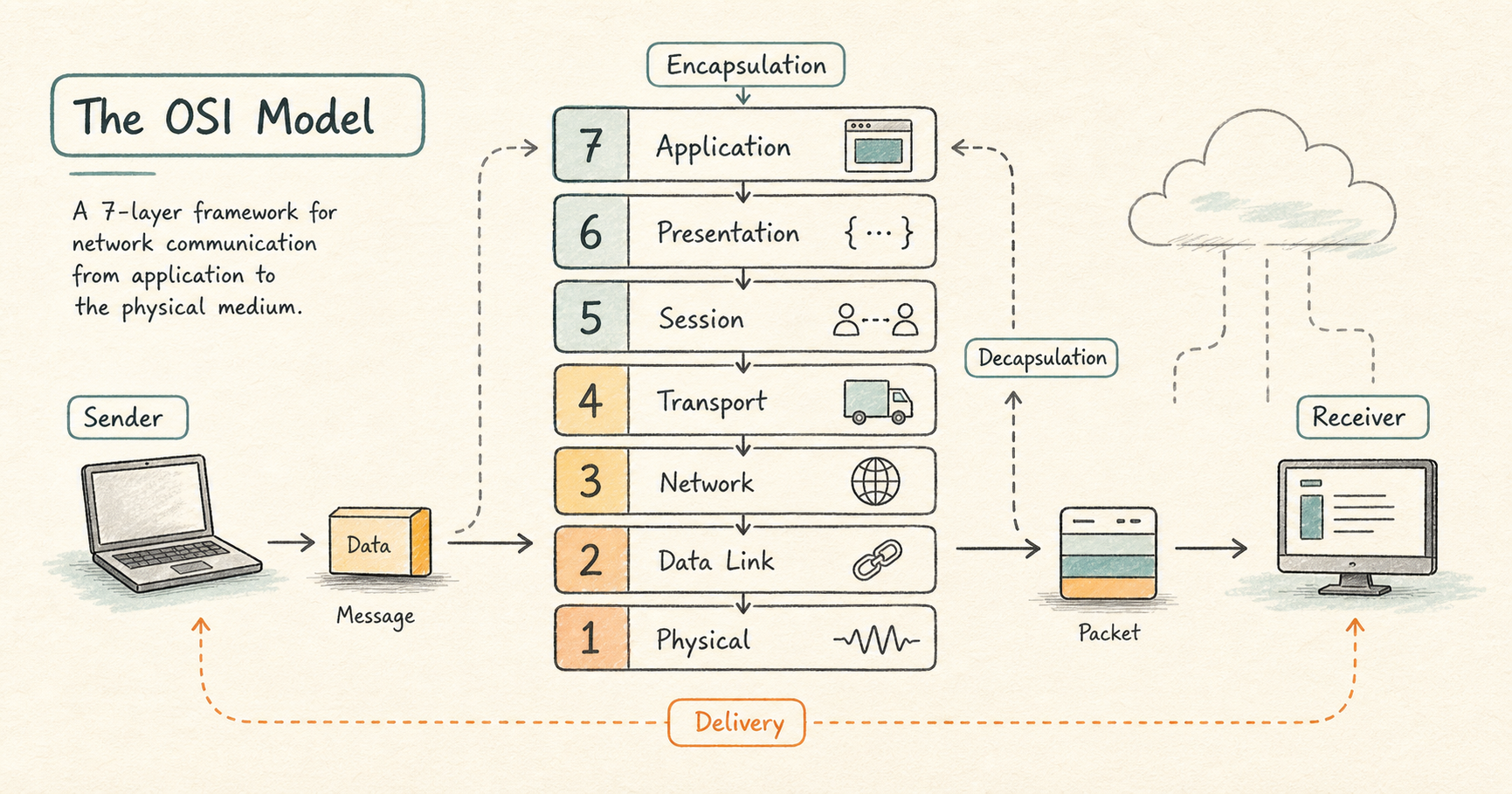
The seven layers
Read this from the bottom (layer 1) to the top (layer 7). The bottom layers deal with wires and signals, and the top layers deal with apps and users.
| Number | Layer | What it does in plain words |
|---|---|---|
| 7 | Application | The programs you use, and the rules they speak (like loading a web page) |
| 6 | Presentation | Puts data in a format both sides understand, and encrypts it |
| 5 | Session | Opens, keeps alive, and closes an ongoing conversation |
| 4 | Transport | Delivers data to the right program, reliably or quickly |
| 3 | Network | Finds a path and delivers data across different networks |
| 2 | Data Link | Delivers data to the correct device on the same local network |
| 1 | Physical | Sends the raw 1s and 0s as signals over a cable or the air |
Each layer in the series above links to a full post that explains it for a complete beginner.
What “data unit” means at each layer
As your data moves down the layers, each layer packages it a little differently and gives that package a different name. You will see these words a lot, so here they are in one place:
- At the top three layers (Application, Presentation, Session), it is just called data.
- At the Transport layer, the data is chopped into pieces called segments.
- At the Network layer, each piece is wrapped into a packet.
- At the Data Link layer, it becomes a frame.
- At the Physical layer, it is finally just bits, the individual 1s and 0s.
They are all the same information. Each name simply tells you which layer is handling it at that moment.
Encapsulation and decapsulation
These two long words describe a simple idea.
When you send something, your data travels down the stack from layer 7 to layer 1. At each step, that layer adds a little bit of its own information around your data, like putting a letter inside an envelope, then putting that envelope inside a bigger envelope. Adding these wrappers on the way down is called encapsulation.
When the data arrives at the other computer, it travels up the stack from layer 1 to layer 7. At each step, that layer removes the wrapper meant for it, like opening one envelope after another until you reach the letter inside. Removing these wrappers on the way up is called decapsulation.
For example, sending an email: your email program hands the message down through the layers, each one adding its wrapper, until the bottom layer sends it out as signals. On the receiving computer, the layers unwrap it step by step until the other person’s email program can show them the message.
Why the model is worth knowing
The biggest practical benefit is troubleshooting. When something on a network does not work, the OSI model gives you an order to check things in. Start at the bottom and work up:
- Is the cable or wireless connection working at all? (Layer 1)
- Can the two devices on the same local network reach each other? (Layer 2)
- Can data reach the correct network across the internet? (Layer 3)
- Is the right program on the other machine reachable? (Layer 4)
- Is the conversation, encryption, and app itself healthy? (Layers 5 to 7)
Checking in this order stops you from blaming the app when the real problem is a loose cable.
A note on the real world
The OSI model is a teaching tool, not an exact description of every system. The internet actually runs on a simpler four layer model called TCP/IP, which bundles some OSI layers together. That does not change the value of the OSI model: it gives you a shared, layer by layer way to think about and talk about networks, which is exactly what a beginner needs.